Showing posts with label picture. Show all posts

Friday, April 27, 2012

How Enzyme Works

This picture has been forwarded and shared world wide with almost 600k views (as of this post being written), a prof in uni/college showed this picture to a class.

Personally, that is the truth of how enzyme should works. :)

LOL. Have a nice Friday and weekend.

Like this if you are FB user and you think this post is useful. The button is at top right of content of this post.
+1 this post if you are Google+ users and you think this post is useful.
Hope you will enjoy this post, subscribe to my RSS or mailing list or follow me on blogger or twitter. :)
source: http://www.reddit.com/r/funny/comments/sryyl/my_gfs_prof_showed_this_to_the_class_not_sure_if/

Wednesday, July 6, 2011

Bluetooth is outdated technology

Is Bluetooth going to be an outdated technology? Yes, why you need bluetooth when you can do this, see picture below. :D
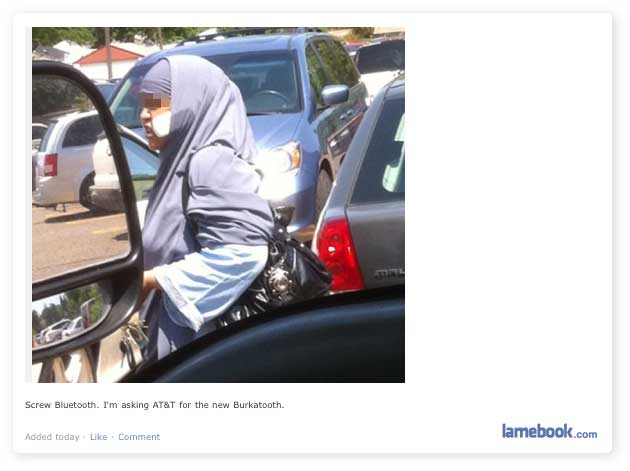


Hope you will enjoy this post, subscribe to my RSS or mailing list or follow me on blogger or twitter. :)
source: lamebook.com

Friday, March 25, 2011

Who sells the most handset/handphone?

Who sells the most handset or handphone (can be smartphone or dump phone :P ) from 2001 to 2010?

Friday, January 29, 2010

How To Put Picture Side by Side in Blogspot or Blogger?

Hi blogger out there, sometime we have pictures or photos to insert into our blog posting, however you should noticed that the pictures or photos cannot be placed side by side, and I did try to changed the setting during uploading the pictures to blogger, but it didn't help at all! After some googling, I found out that the option to place pictures side by side is not available in control panel for unknown reason. The easy part is to do HTML coding. 'HUH? how am I going to do that?!' you might have this thought, don't worry, this is very easy. For those already have experience with HTML, this is piece of cake! You can either use free image hosting site or upload the picture first to blogger and then make the HTML code changes, your choice.

Okay, lets go do it!

Method one - host your image from image hosting site

Related Posts Plugin for WordPress, Blogger...
 
Copyright © 2015 Outdated Penang Uncle
..........