Showing posts with label windows mobile. Show all posts

Wednesday, July 18, 2012

Smartphone Market Share Breakdown (US only)

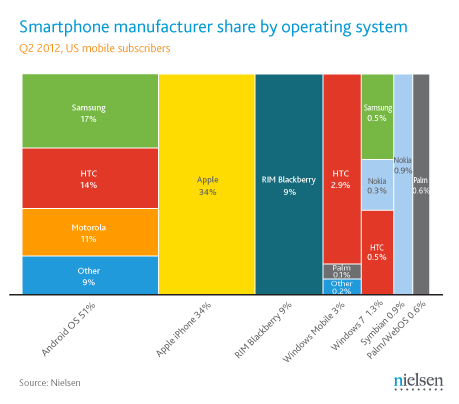
Who got the biggest slice of cake (market share) in US smartphone market? According to Nielsen, Android OS hold the biggest share market, followed by iPhone. The charts below are based on Q2 of 2012.

Apple is the biggest if we count by company, but when Samsung, HTC, and Motorola and other Android phone maker join forces, iPhone drop to 2nd place, muahahaha.
credit: potketnow.com/nielsen/Asymco

I am surprised that Windows Mobile (WM in the chart) market segment is still bigger than Windows Phone7, plus Symbian, plus Palm/WebOS. Hey, not bad for a very very old mobile OS. I am still using my HTC Touch Elfin, which runs on Windows Mobile 6.1 Professional.
credit: potketnow.com/nielsen/Asymco

So, who is your pick for next smartphone? For me, I am definitely go for Android.


Like this if you are FB user and you think this post is useful. The button is at top right of content of this post.
+1 this post if you are Google+ users and you think this post is useful.
Hope you will enjoy this post, subscribe to my RSS or mailing list or follow me on blogger or twitter. :)
source: Nielson/pocketnow/Aynmco

Friday, March 2, 2012

Using WIFI to access files on Smartphone

Wired or bluetooth, that is only option to access the files on your smartphone from your PC or laptop. While transfer speed over bluetooth is super slow compare to wired method, wired method does not sounds cool. Recently I found an apps that allow me to access the files on my smartphone using WIFI. As we know WIFI speed can reach up to a few Mbps (don't be fool by advertisement of 11Mbps or 54Mbps or 300Mbps), file transfer would be as smooth as 7-11's smoothies.

Introducing WIFI Remote Access Basic. Yes, it is free.

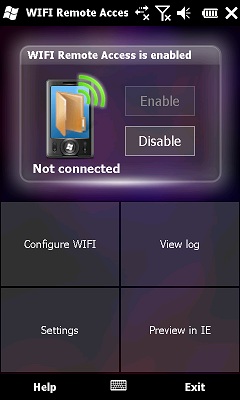
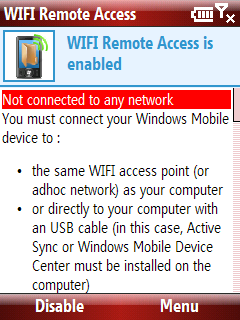
All you need to do is download this apps into your smartphone, install it, turn on the WIFI on your smartphone and get the IP number on the apps.


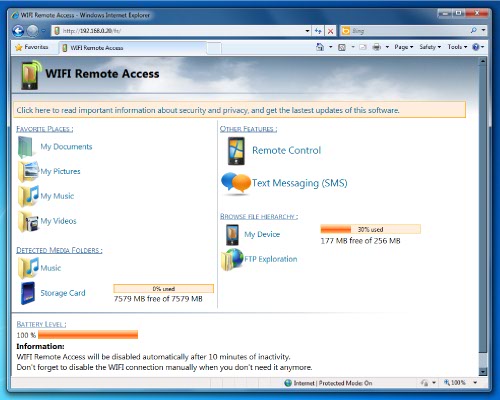
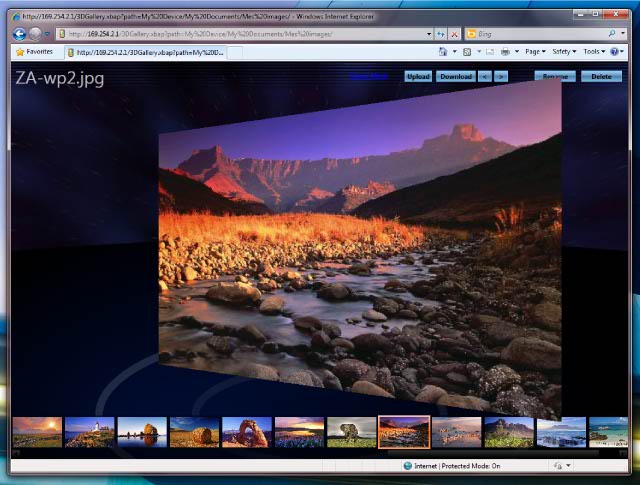
Then on laptop or PC, using IE (6, 7, or 9) [other web browsers might have problem] to open that same IP to access the files on your smartphone!

Photos view:

There is also a premium version which cost US$7.99 which includes FTP, text message support and remote control of smartphone.

Too bad this apps only available for Windows Mobile 6.0, 6.1 and 6.5 only. Not available for WP7/7.5,  Android and iOS yet.

Who says Windows Mobile is obsolete? :P

Opps...... Not to forget the link to the apps:
http://www.julien-manici.com/windows_mobile_wifi_remote_access/
Look for the blue color "Download" button after "Add a comment" on above link.


Like this if you are FB user and you think this post is useful. The button is at top right of content of this post.
+1 this post if you are Google+ users and you think this post is useful.
Hope you will enjoy this post, subscribe to my RSS or mailing list or follow me on blogger or twitter. :)
pix source: http://www.julien-manici.com/windows_mobile_wifi_remote_access/

Monday, February 20, 2012

Running Windows Mobile on Windows Phone 7

Someone managed to port Windows Mobile to Windows Phone 7. Why would someone want to run Windows Mobile on Windows Phone 7?

Simply because Windows Mobile is a classic. Same like vinyl record, it is an old type of audio storage with lots of disadvantages (noises, statics, huge size, etc), but why do some people still prefer to listen it? Because there are a lots of memories to it and also the sounds some people claimed that it is still the best media to hold. CD, DVD, Super Audio Disc, MP3, AAC, etc etc are digital signals that convert the analog sounds to digital format and then when you want to listen, the analog sounds being constructed back from the digital format, therefore some information are lost during the conversion.

So back to this Windows Mobile on Windows Phone 7, for Windows Mobile users, WM served as good old memories. In fact I am still using my WM phone, the HTC Touch Elfin. I use it to make phone calls, sms, surf net (very slow, still works), read ebooks, play music for my children, snap photos, etc.


This video is just preview of the WML (WM Loader). It still not available publicly.


Like this if you are FB user and you think this post is useful. The button is at top right of content of this post.
+1 this post if you are Google+ users and you think this post is useful.
Hope you will enjoy this post, subscribe to my RSS or mailing list or follow me on blogger or twitter. :)
source: Youtube

Monday, August 29, 2011

Rare keyboard layout series - 6

To read other article of this series, click here.

Also invented to type faster than speeding bullet QWERTY keyboard layout, FITALY keyboard layout minimize distance traveled while entering a word.
z v c h w k
f i t a l y
n e
g d o r s b
q j u m p x

Was implemented on very old generation of pocket PC and Windows Mobile and also table PC (NOT iPAD OKAY?). This guy also never take off, I mean this keyboard layout. Pocket PC and Windows Mobile are the ancestor of iPhone and iPad, apple fan boys, don't laugh, without these ancestor, you don't have iPhone and iPad okay?

See why these rare keyboard layout failed at the summary post. (coming soon [link here])


Hope you will enjoy this post, subscribe to my RSS or mailing list or follow me on blogger or twitter. :)
source: I wrote this and pictures/table and some sentences from wiki.

Saturday, June 18, 2011

SlideIT Keyboard for Windows Mobile is free now!

SlideIt keyboard is the competitor for Swype. Just like Swype, you can tap or slide to write on your touch screen smartphone. Previously you need to pay for SlideIt for Windows Mobile, however now it is free. For how long? I am not sure, I have downloaded it as soon as I found out it is free now. It cost US$5.99 for Android version and €3 for Symbian version.

Detail of SlideIt click here.

The download link for Windows Mobile click here.

Hope you will enjoy this post, subscribe to my RSS or mailing list or follow me on blogger or twitter. :)
source: mobilism

Monday, November 15, 2010

Skyfire abandoned WinMo

Skyfire has abandoned WinMo, the community is angry but Skyfire management is not doing anything about it.

http://support.skyfire.com/forums/index.php?showtopic=5992

What is Skyfire you might ask? Skyfire is powerful web browser for smartphone that support flash, mainly for WinMo and symbian. However recent Skyfire moved to apple apps store. Since then WinMo and Symbian users have problem accessing Skyfire. Web browsing using Skyfire was nice because the browser works with the company server to optimize the web content you surfing, but now not anymore for WinMo and Symbian.

Sorry, appls apps store is just way too good to earn money already. :P

Sunday, November 14, 2010

Freeware PPC: Top Notes

Missed the sticky notes in your study table or cubicle? Now you can have it on your Windows Mobile phone. Windows 7 also have this feature and since it is build in on Windows 7, so it is free. Now, back to Top Notes. This apps will put the sticky note on top of the "Today" screen.


Requirement: Windows mobile device with .NET CF 3.5

To download, go to:
http://yossoft.webfreehosting.net/topnotes.html


Hope you will enjoy this post, subscribe to my RSS or mailing list or follow me on blogger or twitter. :)

Saturday, November 13, 2010

Freeware PPC: Paul's Pick 1.1

Okay, Paul is death, but its' left behind some legacy, if you still remember World Cup 2010.

Saturday, November 6, 2010

Freeware PPC: WinStart

Although people start to forgot what WinMo is like, but there are still a lot of good people there writing some amazing apps for WinMo, example WinStart. Written by a member of XDA, it is to replace Start Menu on all of WinMo6.* (6.0 ~ 6.5.3).

Wednesday, November 3, 2010

Are you cheap labor?

Are you cheap labor? Or you are as expensive as your company's CEO based on the hours your work? Use this software to calculate for you.

Thursday, April 29, 2010

Freeware: Spb Mobile Shell - Microsoft Today - HTC Sense\TouchFLO\TouchFLO3D Switcher

Source: http://forum.xda-developers.com/showthread.php?p=6245113#post6245113

Easily switch between Microsoft Today, HTC Sense\TouchFLO3D\TouchFLO, Spb Mobile Shell!!

I also wanted to be able to put links on the Spb Mobile Shell and HTC Sense Screens for easy running so I made seperate programs with icons for Microsoft Today, HTC Sense\TouchFLO3D\TouchFLO and Spb Mobile Shell so you can switch at the click of a button.

It should work regardless of which language Rom you use.

After install it will be in the Start Menu, Programs, Shell Sense Switcher Folder. The Htc Sense link should work for HTC Sense (newer Roms) or TouchFlo3D.

I hope a few people find it useful.

EDIT: v2 now has better icons and smaller file size.

Tuesday, April 27, 2010

Freeware: SpoonCharge - Fullscreen Battery Monitor

Source: http://forum.xda-developers.com/showthread.php?t=669862

Introduction
This is a small application which displays the current battery information in large text.

I wrote it so I could see from a distance what the charge level was, and how fast the battery was charging.

The current version assumes:

<100ma 200ma =" Slow" 500ma =" Medium">500ma = Fast charge (dedicated AC adapter)

The colour of the text also changes depending on levels, and temperature.

This has only been tested on a Diamond2, but should work on most Windows Mobile 5+ phones.

Thursday, January 28, 2010

S2U2 v2.30 is available!

Wow wow wow...... Really salute this fler, A_C. I really like S2U2, this apps allow me to change the unlock screen on my WinMo looks cooler than iPhone. Lots of theme to be change to coz a lot of nice people out there making the S2U2 skins/themes. So no ending of fun to make your WinMo phone looks cool and without need to pay extra money!!!!!! And yes S2U2 is free!

Now S2U2 v2.30 has the choice to slide from middle, not just from left like iPhone. I have downloaded it, going to update it on my phone tonight!


Get it here:
http://ac-s2.com

Changes of v2.30
- added option to replace the WM6.5 system manual lock (S2U2 Settings > Advanced).
i.e. press the system start icon/button, then press lock will start S2U2;
suggest to soft-reset after upgraded to this version; if it does not work, please refer to the FAQs.
- added option to change the position of the slider, either left or center (S2U2 Settings > Appearance).
new tags (s_S2DDismiss, s_S2DCancel, s_S2DView & s_CS2UText) added to lang.ini for the texts shown around the slider.
- added option to mirror the sliding text when the slider is on the center (S2U2 Settings > Appearance).
- added option to show "slide to dismiss/cancel" when the SMS/Email/Alarm/Reminder/Missed call is shown (S2U2 Settings > General).
- added option to show today's past appointments in italic font (S2U2 Settings > Appointment).
- added support for TouchFLO Music player; play TouchFLO Music in screen off and locked.
- added command switch -unlock for iLock2 to unlock S2U2.
- improved the CallerID compatibility on some non-English devices (again).
- fixed the BACK key not worked on some devices with the DPAD option turned on (S2U2 Settings > Others).
- a few minor bugs fixed.

Wednesday, January 20, 2010

OpnMarket - get your ppc freeware with it!

No, I didn't have typo, it is OpnMarket. It is an application develop by Freewarepocketpc.net. Usually I got to this website to find all sort of ppc freeware, now they make it even easier, coz you don't need to open your browser, search for it, download it, locate it and install it. All can be done within the apps. Cool right?

See the demo of the apps:
http://www.youtube.com/watch?v=d0Dm5xMJQpc

Get it here!
http://www.freewarepocketpc.net/opnmarket/

You have to register with Freewarepocketpc.net to use this apps, but it is free (of course la!).
You can use mobile network connection (GPRS, etc) and also WIFI! This is really cool!, I can't wait to download it to my HTC Touch and try out at nearest coffee shop (that with free WIFI, of course la!).

Sunday, July 26, 2009

Pocket Sudoku

What I did after getting my own pocket PC? Look for freeware/free games. So the first game that I installed on my HTC touch is Pocket Sudoku.


Sometime I play sudoku on news paper, or on laptop. But with this Pocket Sudoku, I can play whenever I want (except driving and bath la, hehehe).

Since there is no left/right click on pocket PC compare to laptop/desktop, the clicking the number of rely on the clicking using stylus (boxes too small for finger). And select number by clicking on right bottom edge to change the number to fill in. You can choose the level of difficulty. you can find out how to play at its help.

It is freeware, so meaning it is FREE la!

Thursday, July 23, 2009

pTravelAlarm for pocket PC

The original Alarms that comes with Windows Mobile has some limitations:
1. only 3 alarm settings
2. the snooze button too small (just like task's reminder)
3. I don't like the alarm sound, although there are a few sounds to choose

pTravelAlarm overcome the limitations mentioned above:
1. big display, yea, anybody would need it when try know the time and see if can sleep for another 10 mins or not.

2. big snooze button, yea, I could easily press the snooze button and continue to sleep for another 10 mins (up to you to set it)

3. 10 alarms settings, yea, you could define different wake up hour from monday to sunday and still have 3 more you can use. Also you can have different alarm sound to wake you up for each day.

4. I like one of wave file came with the software - bugle.wav, yea, it sounds like the horn blow sound in military movies.
5. I could adjust the volume of the alarm sound for each alarm setting.


Anyway, today topic is very dry. Compansate yourself by look at the photos on Mr. Dali's blog la, malaysianfinance.blogspot.com, heheh.

Wednesday, July 22, 2009

Voice commander for pocket PC

I did notice I got this software came with my phone but I didn't understand the usage until after a few weeks after I got the phone when I read the ads about apple iphone 3GS talking about voice recognition somethings. Then I thought, what the hack, I got this thing all this while on my phone! Wau lau eh...... apple, apple, now only you try to bluff people that this is very new thing on iphone. oh ya, this is new to iphone 3GS la, but this thing already exist in pocket pc/smartphone all this while already. But have to recognized apple's expertise in marketing, people will buy it anyway. When you take out any iphone, your friends will say 'wah.... iphone wor.....', or at least they will raise the eyebrow a bit lo. When I take out my phone, people will ask 'what is that? oh...... htc touch/pocket pc, why not buy Iphone r?' :P Anyway, I tend to always chui sui until too far.


Back to the topic, I was playing with this voice commander a bit only, but only know that this is very useful until I got my own outdatedpenanguncle bluetooth headset (will talk about it in near future, hopefully). I dunno is it the bluetooth setting or the voice commander setting (dun ask), but when I press the call button on the bluetooth headset, the voice commander will be activated and asking for my command on the bluetooth headset. This is very useful when I am driving, I don't need to look at the screen of the phone to look for a contact to call (safety safety!), I just need to say "call abc", and it will verify it before it make the phone call. It also can be use to find contact, play music, start an application, check new sms/email, call history and ask for the time. I haven't really got familiar with this software, so sometime it do other things that I said. This happen often when I use it on the old plotong car, but it responded quite accurate in a room. So this must be the glitch caused by noisy sound from the old plotong la.

p/s:
Did I get any incentive from doing the software introduction/review? Not now, but if really got software company want to rasuah me, I might blow blow a bit for them lo. What to do? Money can buy almost everything what...... Hey apple, rasuah me la, a few biji of your stock also can liao. :P
Related Posts Plugin for WordPress, Blogger...
 
Copyright © 2015 Outdated Penang Uncle
..........