I always searching for alternative lockscreen. Recently I have been using LockScreen Free, however sometimes this lockscreen apps will hang because it is not stable yet. Last night I wanted to snap a photo, but it hang at that very moment that I need to turn on the phone. https://play.google.com/store/apps/details?id=lockscreen.one.touch.free&hl=en
Today I saw this new LockScreen apps, it is not in Google Play store yet, but I have sign up for it.
In the video it looks promising. But very similar to the lockscreen that we unlock and immediately go to the apps we want to check.
Like this if you are FB user and you think this post is useful. The button is at top right of content of this post.
+1 this post if you are Google+ users and you think this post is useful.
Hope you will enjoy this post, subscribe to my RSS or mailing list or follow me on blogger or twitter. :)
source: wild wild web
Apple has been suing many companies because they claimed that these company copied their design. However now they are the one copying the rest. From this video below, you can find traces of Android, Windows Phone and even BlackBerry. iOS7 and Apple, welcome to the world of copying. Steve Jobs would jump out of his grave to scream at Tim Cook, if he can do it.
Like this if you are FB user and you think this post is useful. The button is at top right of content of this post.
+1 this post if you are Google+ users and you think this post is useful.
Hope you will enjoy this post, subscribe to my RSS or mailing list or follow me on blogger or twitter. :)
source: youtube!
Wonder how is the CPU on your phone is being use? Do you really need a quad core or octa core on your new smartphone? Are your smartphone really sleep when you ask it to sleep? CPU Spy is a good apps to do the job. Yes, I am a geek, I always like to know what is going on inside my laptop and phone, I found this apps from XDA forum.
This apps is not exactly new concept, the original apps has been around for 2 or 3 years on XDA and Google Play. But the interface of the original apps was not keep up to date with Android OS. So Mirko Dimartino got the permission of the CPU Spy to re-create the apps.
Like this if you are FB user and you think this post is useful. The button is at top right of content of this post.
+1 this post if you are Google+ users and you think this post is useful.
Hope you will enjoy this post, subscribe to my RSS or mailing list or follow me on blogger or twitter. :)
source:TARGET="_blank"
I can't really play RPG or strategic games because I will be hook on the games for endless night.
Therefore nowadays I choose casual games where I can finish the game within few minutes just to kick out some boredom.
FruitPunch is the latest game that I am playing now. It is something like tetris, bejewel and with gravity. See the demo video:
Like this if you are FB user and you think this post is useful. The button is at top right of content of this post.
+1 this post if you are Google+ users and you think this post is useful.
Hope you will enjoy this post, subscribe to my RSS or mailing list or follow me on blogger or twitter. :)
source: wild wild web!
Like this if you are FB user and you think this post is useful. The button is at top right of content of this post.
+1 this post if you are Google+ users and you think this post is useful.
Hope you will enjoy this post, subscribe to my RSS or mailing list or follow me on blogger or twitter. :)
source: recommended on XDA
For those that would prefer not to be too risky with Android Apps, this post is for you.
Even though I subscribed to news from XDA, there are a lot more apps that being posted at many more forum. I would like to try them out, but would not like to mess up with my SGS2.
Usually I would like to try new apps on my SGS2, however I have a set of rules to determine should I try the apps or not.
1. If you are getting an apps from other forums, check on Google Play first if there is free version available. Google Play is the trusted source of apps or apk. There are trusted forums, but we cannot confirm all the posted apk are safe.
2. Second point for consideration is to look at "Average rating". Unless I am very interested with the apps, I will just skip anything that is less than 4.0 rating.
3. The third one to look at is "User Reviews". There are reasons why user would give a 1 star or 2 star.
4. The forth one that always make or break is how many percent of users gave 1 star out of total users that gave review. Example for this apps, there is about 19.9% users gave 1 star! This is one of the apps we should avoid!
I have listed out the steps for searching quality Android apps, hope that you can have a reference to find your favourite apps. :-)
Like this if you are FB user and you think this post is useful. The button is at top right of content of this post.
+1 this post if you are Google+ users and you think this post is useful.
Hope you will enjoy this post, subscribe to my RSS or mailing list or follow me on blogger or twitter. :)
source: I wrote this!
Like this if you are FB user and you think this post is useful. The button is at top right of content of this post.
+1 this post if you are Google+ users and you think this post is useful.
Hope you will enjoy this post, subscribe to my RSS or mailing list or follow me on blogger or twitter. :)
source: XDA
Ever since I got my own SGS2, I have been using the stock ROM and stock launcher. Even though it is ICS, however the stock TouchWiz made by Samsung become super boring after few weeks of usage.
Therefore I started to look for different type of launchers. If you are fans of launchers, you should be familiar with apex launcher, nova launcher, and ADW launchers. By chance, I came across Light Launcher.
With less than 200kB, this should be the lightest launcher.
What I like about Lightning Launcher:
simple
very smooth
very fast
very light
very customizable
support gesture for some actions
can backup settings
FREE!
What I think Lightning Launcher could be better:
no support for icon packs just like apex/nova/adw [gonna missed out a lot of fun!]
too customizable that I was lost [I am Penang Uncle, okay?]
home and apps drawer share the same wallpapers [can't have one for each]
Update: If you want see some demo, here is a youtube video:
Like this if you are FB user and you think this post is useful. The button is at top right of content of this post.
+1 this post if you are Google+ users and you think this post is useful.
Hope you will enjoy this post, subscribe to my RSS or mailing list or follow me on blogger or twitter. :)
source: wild wild web
I always like stickies since high school time, it helps to remind me of project due dates, what should I focus on, what are the homework. of course that time that stickies is the real papers. It save money, I recycled papers that I collected from PC fair, at that time you can get whole stack of papers just take around at the PC fair, most of them just being print on one side, so I get to use the other side.
When I start working, stickies still a great tool for me. There are a few stickies program for Windows XP. First version of Windows 7 come with a gadget that is exactly a stickies, however Microsoft removed it on sub-sequence version of Windows 7. Now with almost everyone on smartphone, there should be stickies for smartphone right?
Wrong, of all the stickies (Android, iOS, and others), stickies has to works within that apps itself, there is not way to take a note on stickies while looking at other apps (browsers, emails, sms, etc). Unless you have Galaxy S 3 or Note 2 that have multiple windows function, you have to do these:
1. You remember the numbers or words, then close the apps, open stickies and write it on stickies. Oh-no, what was the last digit? Okay, you have to open the apps just now and repeat the steps.
2. Write it on a piece of papers and then write it back to the stickies apps. Sigh.
3. Print screen.
Now I found the real stickies on XDA forum. It works just like the one on Windows. It is called Floating Stickies.
You can dock it to side of the screen, as well as resize it. I like it!
Watch the demo video, I am installing this apps now!
Since it supports Android 2.1 and above, majority of Android users can install and use it!
I have a quick check on iTunes, no iOS apps works like this one. Take that Apple fan boys, muahahahaha.
Like this if you are FB user and you think this post is useful. The button is at top right of content of this post.
+1 this post if you are Google+ users and you think this post is useful.
Hope you will enjoy this post, subscribe to my RSS or mailing list or follow me on blogger or twitter. :)
source: XDA
If you are too young, you might don't know what is 8-bit. 8-bit was once rules the gaming world, where all the game are just 256-colors. No 3D, but we did enjoyed Wolfenstein 3D.
Sheep Jump is purposely made 8-bit. Have that kind of retro feel.
What Sheep Jump have to offer:
1. infinite amount playtime -> can't stop playing if you are addicted
2. endless level -> can't finish the game??????
3. unpredictable jumps -> the sheep or the player?
4. controlled physics -> who? God?
5. Global leaderboard -> I just want to enjoy this game, don't care the score at all
6. support multiple players -> you can compete with family/friends on same phone
Problems that I found on Sheep Jump:
1. you need to connect to internet to create player
2. must register in order to play
3. ads when you are connected to internet -> hate it, should ban apps with ads with any "free" name or keyword.
4. some users claimed that ads interfered with the game play.
Like this if you are FB user and you think this post is useful. The button is at top right of content of this post.
+1 this post if you are Google+ users and you think this post is useful.
Hope you will enjoy this post, subscribe to my RSS or mailing list or follow me on blogger or twitter. :)
pix source: XDA
Okay, OS is not Operating System, it is Open Source in this case.
Ever since smartphone come with decent camera, everyone keep on snapping photos with their smartphone, either Android, iPhone, WP, BB, etc. While stock camera apps and free and paid camera apps try to make you know that you are snapping a photos by creating a camera sound. However at some cases you just want to take the photo without anyone noticing it. Okay, you can change to mute to avoid people noticing it, but the preview on the screen already tell others that you are taking a photos. So how now?
Senior member of XDA created this camera apps, called Spy Camera OS.
As you can see from the picture below, the preview is very small.
Here is what Spy Camera OS will does:
1. Automatically mute the phone when apps start -> no camera sound, it will switch back to your existing setting after you exit the apps.
2. Take video -> even though author claimed that it is still experimental, I have tried it out, and it works!
3. Take photo with black screen -> now no one will knows you are taking photos, but problem is you don't know are you aiming correctly, this should work together with auto mode. Also take photo when touch the screen during black screen.
4. Auto mode -> take photo at the period that you set (1 photo every 1 to 10 seconds).
5. Hide the photo folder -> in case you still get caught, they can't find the photo.
6. Configure photo/video size upfront -> so that you don't run out of memory or taking a photo that is too blur.
7. Configure volume buttons to take photo/video/etc -> nice!
8. Face detection auto shot -> I tried, but it didn't works on me, can't recognize my face??????
9. Save to internal or external storage -> every apps should have this setting!
What are the things Spy Camera OS that missed out:
1. burst mode
2. make the preview transparent
Like this if you are FB user and you think this post is useful. The button is at top right of content of this post.
+1 this post if you are Google+ users and you think this post is useful.
Hope you will enjoy this post, subscribe to my RSS or mailing list or follow me on blogger or twitter. :)
pix source: Spy Camera author
Pleco has been in business for very long time. I know about Pleco when I was using my HTC Touch Elfin, that is Windows Mobile OS. Pleco has been on WinMo, Palm OS, iOS and now Android.
It is very good tool for students, as well as people that just started to learn Chinese. The reason is Pleco support pinyin input. So for those that lazy to write, as long as you know the pronunciation of the Chinese character or words, just type the pinyin. Example:
You should install Pleco now, it is because handwriting input module is free for now (Android only!), until Jun 30th this year. This module usually cost USD $14.95. I have checked, this module is not free on iOS. So iPhone/iPad/iPod Touch only can key-in pinyin or Zhuyin (for traditional Chinese - HK, Taiwan). Muahahaha. The handwriting module is for you to keep after the offer ended, Pleco will issue you a code that you can download it again for free if you move other a newer Android phone in future (example: Samsung Galaxy S4?)
More muahahaha after checking on pleco.com:
Audio Pronunciation (male) module - free on Android; $9.95 on iOS -> muahahahaha
Audio Pronunciation (male) module - free on Android; $9.95 on iOS -> muahahahaha
Flashcard system - free on Android, $14.95 on iOS -> muahahahaha
Unlike other dictionary apps which one dictionary per apps, Pleco support multiple dictionaries. CC-CEDICT Chinese-English Dictionary is the default dictionary. The list of free dictionary that you can download and add to Pleco:
Unihan Database (extended)
Adsotrans Chinese-English Dictionary
LDC English-Chinese Wordlist
HanDeDict Chinese-German Dictionary
DeHanDict German-Chinese Dictionary
CFDICT Chinese-French Dictionary
Pleco also offer license transfer from one OS to another within 1 year of license purchased. So if you regret that you bought the lousy iPhone, don't worry about Pleco dictionary, you can email Pleco so that you can have the same dictionary on Android, without any extra changes (if not mistaken).
Caution: Pleco need to download additional files (most probably the default dictionary) during first run, make sure you are on WiFi or unlimited data plan.
It also reported works on CyanogenMod and other popular ROMs.You can download it from Pleco website: http://www.pleco.com/getandroid
Like this if you are FB user and you think this post is useful. The button is at top right of content of this post.
+1 this post if you are Google+ users and you think this post is useful.
Hope you will enjoy this post, subscribe to my RSS or mailing list or follow me on blogger or twitter. :)
pix source: Pleco.com and Google Play
Your Apple fanboy friends always show off 3D games on their iPhone/iPod/iPad and you still wonder why you choose Android at first place? Don't doubt it anymore, you made the right choice. SGS2 is almost 2 years old device, but Samsung going to release Jelly Bean for it. For those that already flash with alternative ROMs, you know that SGS2 is capable of running Jelly Beans without any hiccup. Therefore, time to laugh at your friends who has to queue up at Apple store every year to buy a new device.
Here is a 3D game that you can impress the Apple fanboy:
I am too lazy to explain the game, you can read it at Google Play. Watch the featured video.
This link is to the Google Play (Lite version): SiliBili Lite
If you are really hooked with the game, consider buying full version to support the developer. SiliBili (Full version)
Like this if you are FB user and you think this post is useful. The button is at top right of content of this post.
+1 this post if you are Google+ users and you think this post is useful.
Hope you will enjoy this post, subscribe to my RSS or mailing list or follow me on blogger or twitter. :)
pix source: Google Play
Android and iOS can be activated without any PC or Mac. However for some it would be more convenient to manage their Android from PC or Mac. Example for those that don't like to sign up data plan.
SnapPea is written in China. What is not made in Chine nowadays? :P
It can organized your contacts, musics, and pictures on your Android. You can download free apps through SnapPea and SnapPea will install into your Android, no need to sign up any data plan. You can also write text message on your PC and send through the phone. Another attractive point of SnapPea is your can import music from iTunes, no need to manage another list.
Here is the feature video from SnapPea.
One thing I could not understand is the English version and Chinese version setup file as well as website are called different name. Just curious.
Like this if you are FB user and you think this post is useful. The button is at top right of content of this post.
+1 this post if you are Google+ users and you think this post is useful.
Hope you will enjoy this post, subscribe to my RSS or mailing list or follow me on blogger or twitter. :)
source: wild wild web
ZooKeeper was once a very popular game based on flash being played by a lot people on WIndows and online as well. Too bad it is not free on Google Play. However now there a free new game from same developer.
Similar to the original ZooKeeper, the game play quite similar, line up 3 or more same animal. But getting combo is just how you going to beat the other players that you going to match with.
Like this if you are FB user and you think this post is useful. The button is at top right of content of this post.
+1 this post if you are Google+ users and you think this post is useful.
Hope you will enjoy this post, subscribe to my RSS or mailing list or follow me on blogger or twitter. :)
pix source: google play
We don't need to worry about free apps or games on Android, there are plenty of them. In fact there are too many that you will never ever install all of them because memory and microSD card will be full way before you can install half of them! :P
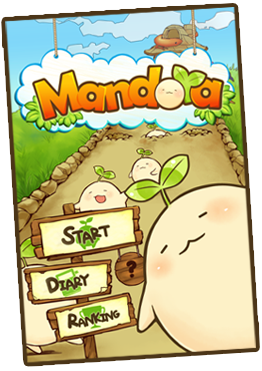
I found this game Mandora recently from some free stuffs website from Taiwan. Mandora is made in Taiwan. But don't worry, the interface is in English.
What you need to do is pluck the mandora seed when they are ripe. The question mark in above picture will show you how.
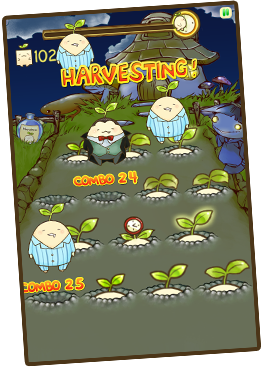
I was skeptical about this game right after I installed it on my wife's Samsung Galaxy W because there is no button to choose level or difficultly. However when I check back it's website, then only noticed that the game play will depend on the time you play. If you play at night time, you will see this:
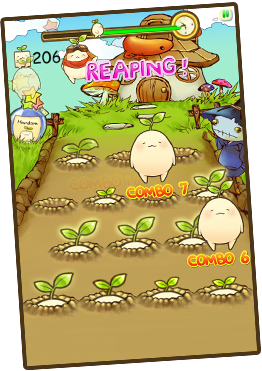
If at daytime:
At evening also you can see the sky start turn to orange color. No picture of this but you can go ahead try it out.
p/s: I am competing with my wife of the ranking of this game, hehehe.
Like this if you are FB user and you think this post is useful. The button is at top right of content of this post.
+1 this post if you are Google+ users and you think this post is useful.
Hope you will enjoy this post, subscribe to my RSS or mailing list or follow me on blogger or twitter. :)
pic source: http://www.rayark.com/g/mandora
Nexus 4 is Google 4th Android phone, which released on Nov 13, 2012.
Okay, let's start with geek stuffs:
- 4.7" 1280 x 768 pixel touchscreen LCD with IPS
- Qualcomm Snapdragon S4 Pro system on a chip (SoC) with 1.5 GHz CPU
- 2 GB RAM
- 8 megapixel rear-facing and 1.3 megapixel front-facing cameras
- Near field communication (NFC)
- Android 4.2 (Jelly Bean)
More geek stuffs inside this phone:
- Toshiba THGBM5G6A2JBA1R 8GB Flash
- SlimPort ANX7808 SlimPort Transmitter (HDMI output converter)
- Invensense MPU-6050 Six-Axis (Gyro + Accelerometer)
- Qualcomm WTR1605L Seven-Band 4G LTE chip
- Avago ACPM-7251 Quad-Band GSM/EDGE and Dual-Band UMTS Power Amplifier
- SS2908001
- Avago 3012 Ultra Low-Noise GNSS Front-End Module
- Samsung K3PE0E00A 2GB RAM. We suspect the Snapdragon S4 Pro 1.5 GHz CPU lies underneath.
- Qualcomm MDM9215M 4G GSM/CDMA modem
- Qualcomm PM8921 Power Management
- Broadcom 20793S NFC Controller
- Avago A5702, A5704, A5505
- Qualcomm WCD9310 audio codec
- Qualcomm PM8821 Power Management
Now, the teardown:
If you prefer to read it on iFixIt website, here is the link: Nexus 4 Teardown
Like this if you are FB user and you think this post is useful. The button is at top right of content of this post.
+1 this post if you are Google+ users and you think this post is useful.
Hope you will enjoy this post, subscribe to my RSS or mailing list or follow me on blogger or twitter. :)
source: iFixIt
There is a problem with native Android interface (anything older than ICS), you have to click and click and click and click to enable or disable data connection (GPRS/EDGE/3G). I always like my interface on my Windows Mobile, where just 2 clicks and I am on/off the data. I found this widget recently.
For free version, you get to enable/disable data and WIFI respectively.
For Advanced PRO version, which include these features, that going to cost you US$1.26.
- how many minutes in between to turn on data
- how many seconds to allow data turn on before shut it off
- etc.
Anyway, I am only interested for the on/off feature as the widget, that is good enough for me.
Like this if you are FB user and you think this post is useful. The button is at top right of content of this post.
+1 this post if you are Google+ users and you think this post is useful.
Hope you will enjoy this post, subscribe to my RSS or mailing list or follow me on blogger or twitter. :)
pix source: google play
Problem with smartphone is there is no way to upgrade the hardware. Okay, the only way is to buy a new smartphone. Or get a bigger microSD card, but only if it support it. Therefore I would never buy iPhone, except you give me a free one, hahah.
The best thing about Android (and Windows Mobile, yes, the dinosaur mobile OS) is customization. All you need to do is search in Android forum such as XDA and you will find something very useful to make your Android has a good feel.
So if your phone is confirmed not getting Jelly Bean (Android 4.1), but you would like to have a good stuffs of Jelly Bean, this app might be one of them you can add to your Android.
Control panel for Android: Quick access the ringtone, volume and bright adjustments selector.
Quick access the personalization options using the quick settings that works like to the new Android 4.2 feature.
You can launch the quick setting with some launchers gesture:
Like this if you are FB user and you think this post is useful. The button is at top right of content of this post.
+1 this post if you are Google+ users and you think this post is useful.
Hope you will enjoy this post, subscribe to my RSS or mailing list or follow me on blogger or twitter. :)
pix source: XDA
XDA forum is always resourceful and with lots of surprises. Recently there is a tutorial on how to crack or hack Android Pattern Lock. Android Pattern Lock is probably one of the best security on smartphone, well, it depend on how simple of your lock pattern (meaning not secure), or how complex of the lock pattern. Very complex lock pattern can be very secure and safe for your Android, but what if you forgot about? Maybe after a long holiday, you leave the Android at home to have a very relax holiday. You don't want to reset the whole phone because of too many stuffs and apps you already setup properly. So what to in this case?
m.sabra of XDA community written a tutorial consist of 2 methods that you can try. In fact on some cases, you might need to try both to get the Pattern Lock unlock.
Tested on gingerbread,ice cream sandwich and jelly bean.
And you will need to do it through adb. If you don't know what is adb, please read this tutorial:
http://forum.xda-developers.com/showthread.php?t=502010
Method 1:
Each line is a separate command so press "enter" after typing each line.
If either method not working, try this:
1- run the first method
2- reboot
3- run the second method
4- reboot
Note: After running both methods and rebooting you may still see the pattern lock, that doesn't necessarily mean it doesn't work, just try any random pattern and it may unlock then remove the pattern from settings.
This tutorial is not to encourage phone thief, but to help the owner of the Android to recover the phone with need to reset it.
This tutorial should works for both phone and tablet and phoneblet/tablephone (a.k.a Galaxy Note and Galaxy Note 2). But there is no guarantee it will works. If this tutorial doesn't works for you, the only option is to reset it.
Like this if you are FB user and you think this post is useful. The button is at top right of content of this post.
+1 this post if you are Google+ users and you think this post is useful.
Hope you will enjoy this post, subscribe to my RSS or mailing list or follow me on blogger or twitter. :)
source: XDA


.jpg)
.jpg)