Showing posts with label google map. Show all posts

Tuesday, November 12, 2013

Live Traffic Update for Malaysia Google Maps in Penang

Google Malaysia has been doing good job by bring into Malaysia many features that we always see only in developed countries, for example Google Maps.

I remember it was not too long ago that live traffic available in Penang. After Google bought Waze, now Google Maps with Waze update also available for Penang!
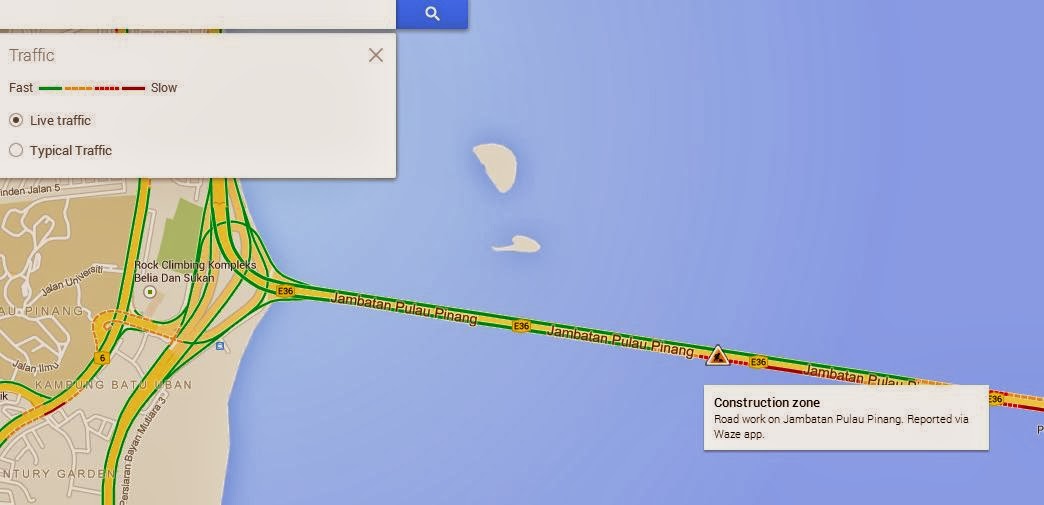

Head to Google Maps now and turn on the Traffic by moving your mouse cursor to the search box and click on the "Live traffic". You can even check on the "Typical traffic" for any of the in a week and at specific time. I would say it is not so accurate for the "Typical traffic" but it is a very good reference to avoid traffic jam at specific hour at the places you want to explore.

Have fun!

Like this if you are FB user and you think this post is useful. The button is at top right of content of this post.
+1 this post if you are Google+ users and you think this post is useful.
Hope you will enjoy this post, subscribe to my RSS or mailing list or follow me on blogger or twitter. :)
source: I wrote this!

Friday, December 14, 2012

Live Traffic Update for Penang on Google Maps

Google Maps has been providing live traffic update for Klang Valley since last year. Since I live in Penang, I am hoping Google do so for Penang. Finally, live traffic update for Penang is here! Melaka and Ipoh also have the traffic update as well.

To enable live traffic update on Google Maps, move your mouse to the right top of the maps, the maps options and other options will be appear, check on the "Traffic" and you can start seeing the traffic. I turned off the satellite view for better view of the live traffic.

Penang live traffic update on Facebook on Outdated Penang Uncle blogspot dot com

It supposedly update for every few minutes. Here look at roads near to USM around 11pm last night:
Penang live traffic update on Facebook on Outdated Penang Uncle blogspot dot com

This should applied to Google Maps on Android and iOS. Btw, Google Maps is back on iOS. Apple fan-boys finally can have Google Maps on their iPhone. Heard that it is much faster now.


Like this if you are FB user and you think this post is useful. The button is at top right of content of this post.
+1 this post if you are Google+ users and you think this post is useful.
Hope you will enjoy this post, subscribe to my RSS or mailing list or follow me on blogger or twitter. :)
source: World Wild Web

Monday, June 27, 2011

Something on Google Maps you should see

Arg...... Monday again! To cure your Monday blue, there is something you should see at Google Maps. We have seen many special stuffs on Google Maps, but this one will blow your mind away! Click read more to find out......

Tuesday, May 24, 2011

Download Google Map with Google Map Saver

Why do you need to save the map when you can view it whenever you are online? Simple, because some of us not always able to be online. Or it could be very costly to be always-on. So a nice guy wrote this software for those that need to look at Google Map regularly without being punish with high data cost. Read more after the jump......

Monday, July 13, 2009

terracrosser - Better than "Google Maps for mobile"

As promised in previous post, terracrosser offer a much better map viewer than google map for mobile. Actually this terracrosser used another program called mapper.exe (which come with the downloaded package) to download the maps from google map and yahoo map on your laptop/desktop. It then compiled the maps into a file that can be read by the terracrosser. The only trick is to copy the map file into your ppc.

This is much much much x12 better than google map for mobile la. why? coz google map for mobile required GPRS data connection. GPRS is very costly in my country (Malaysia). So why bother to make it only works with GPRS only? why not wifi? Why the smart engineers at Google make it such a way? That might be some marketing gimmick. Mobile providers: "You make the program become blood sucker and we share share the profit la"
Goooooogle: "sure, anything you say taukeh"

Anyway, back to terracrosser, you can download maps from google map and yahoo map, and choose the level of zoom. The more zoom-in, the bigger the file size lo. So if you have a few more Gigs to spare on your ppc's external memory card, why not? heheheh.

I have downloaded Penang island, Penang mainland, Taiping, Ipoh and Cameron Highland's maps from google and view them on my HTC Touch after copy the map files into it. If your ppc have GPS then even better, you can use it as a navigator. Syok!

Anyway, remember to read the disclaimer at below of the page before you try out ya, heheh.
Related Posts Plugin for WordPress, Blogger...
 
Copyright © 2015 Outdated Penang Uncle
..........