I always searching for alternative lockscreen. Recently I have been using LockScreen Free, however sometimes this lockscreen apps will hang because it is not stable yet. Last night I wanted to snap a photo, but it hang at that very moment that I need to turn on the phone. https://play.google.com/store/apps/details?id=lockscreen.one.touch.free&hl=en
Today I saw this new LockScreen apps, it is not in Google Play store yet, but I have sign up for it.
In the video it looks promising. But very similar to the lockscreen that we unlock and immediately go to the apps we want to check.
Like this if you are FB user and you think this post is useful. The button is at top right of content of this post.
+1 this post if you are Google+ users and you think this post is useful.
Hope you will enjoy this post, subscribe to my RSS or mailing list or follow me on blogger or twitter. :)
source: wild wild web
Wonder how is the CPU on your phone is being use? Do you really need a quad core or octa core on your new smartphone? Are your smartphone really sleep when you ask it to sleep? CPU Spy is a good apps to do the job. Yes, I am a geek, I always like to know what is going on inside my laptop and phone, I found this apps from XDA forum.
This apps is not exactly new concept, the original apps has been around for 2 or 3 years on XDA and Google Play. But the interface of the original apps was not keep up to date with Android OS. So Mirko Dimartino got the permission of the CPU Spy to re-create the apps.
Like this if you are FB user and you think this post is useful. The button is at top right of content of this post.
+1 this post if you are Google+ users and you think this post is useful.
Hope you will enjoy this post, subscribe to my RSS or mailing list or follow me on blogger or twitter. :)
source:TARGET="_blank"
I always like stickies since high school time, it helps to remind me of project due dates, what should I focus on, what are the homework. of course that time that stickies is the real papers. It save money, I recycled papers that I collected from PC fair, at that time you can get whole stack of papers just take around at the PC fair, most of them just being print on one side, so I get to use the other side.
When I start working, stickies still a great tool for me. There are a few stickies program for Windows XP. First version of Windows 7 come with a gadget that is exactly a stickies, however Microsoft removed it on sub-sequence version of Windows 7. Now with almost everyone on smartphone, there should be stickies for smartphone right?
Wrong, of all the stickies (Android, iOS, and others), stickies has to works within that apps itself, there is not way to take a note on stickies while looking at other apps (browsers, emails, sms, etc). Unless you have Galaxy S 3 or Note 2 that have multiple windows function, you have to do these:
1. You remember the numbers or words, then close the apps, open stickies and write it on stickies. Oh-no, what was the last digit? Okay, you have to open the apps just now and repeat the steps.
2. Write it on a piece of papers and then write it back to the stickies apps. Sigh.
3. Print screen.
Now I found the real stickies on XDA forum. It works just like the one on Windows. It is called Floating Stickies.
You can dock it to side of the screen, as well as resize it. I like it!
Watch the demo video, I am installing this apps now!
Since it supports Android 2.1 and above, majority of Android users can install and use it!
I have a quick check on iTunes, no iOS apps works like this one. Take that Apple fan boys, muahahahaha.
Like this if you are FB user and you think this post is useful. The button is at top right of content of this post.
+1 this post if you are Google+ users and you think this post is useful.
Hope you will enjoy this post, subscribe to my RSS or mailing list or follow me on blogger or twitter. :)
source: XDA
+Send money to anyone, even without UOB account, that can be withdraw from UOB ATM machines
+Load calculator +Latest bank promotions -Does not pay bills
The list is correct at the time I writing this (Jan 2013). Please leave a comment here or on PenangUncle FaceBook page:
1. if you found those that listed here that don't have mobile apps start to have mobile apps
2. other banks that I left out
3. Features that added/removed
Like this if you are FB user and you think this post is useful. The button is at top right of content of this post.
+1 this post if you are Google+ users and you think this post is useful.
Hope you will enjoy this post, subscribe to my RSS or mailing list or follow me on blogger or twitter. :)
source: google google and google
As I moved into Android world (since I got my SGS2, well, I have been playing with Android apps with Android emulators, Jar of Beans, pokki, and bluestacks), I found there are endless of Android apps. Number of free apps on iOS was king, but then was taken over by Android since 2011 or 2012, does not matter now.
Android apps (apk) was not being regulated like iOS, therefore we should always only install apps from Google Play and apps developer only. I was thinking to start using mobile banking apps on my SGS2, therefore doing some research. Hence this list of Mobile Apps of Banks in Malaysia, in no particular order (and features and other stuff are as of Jan 2013, iPad apps not included).
Funds transfer
Pay bills
Balance inquiry
Prepaid reloads
Bank Contacts
Yes
+Fixed Deposit placement +Gold Investment +Load calculator -Transactions allowed on one account only, does not works for other accounts that you have with CIMB
Funds transfer
Pay bills
Balance inquiry
Bank Contacts
Yes
-Android users complained long loading time -Need Adobe Air installed -confusion on the apps name (it is called Breeze - a known detergent brand in Malaysia :P)
The list is correct at the time I writing this (Jan 2013). Please leave a comment here or on PenangUncle FaceBook page:
1. if you found those that listed here that don't have mobile apps start to have mobile apps
2. other banks that I left out
3. Features that added/removed
Like this if you are FB user and you think this post is useful. The button is at top right of content of this post.
+1 this post if you are Google+ users and you think this post is useful.
Hope you will enjoy this post, subscribe to my RSS or mailing list or follow me on blogger or twitter. :)
source: google google and google
Like this if you are FB user and you think this post is useful. The button is at top right of content of this post.
+1 this post if you are Google+ users and you think this post is useful.
Hope you will enjoy this post, subscribe to my RSS or mailing list or follow me on blogger or twitter. :)
source: XDA
We don't need to worry about free apps or games on Android, there are plenty of them. In fact there are too many that you will never ever install all of them because memory and microSD card will be full way before you can install half of them! :P
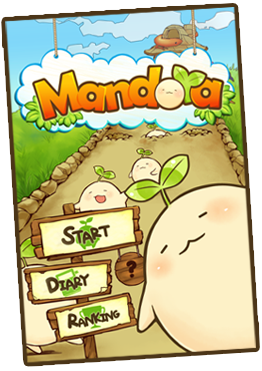
I found this game Mandora recently from some free stuffs website from Taiwan. Mandora is made in Taiwan. But don't worry, the interface is in English.
What you need to do is pluck the mandora seed when they are ripe. The question mark in above picture will show you how.
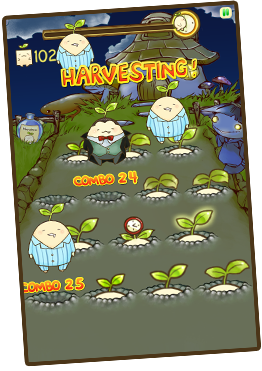
I was skeptical about this game right after I installed it on my wife's Samsung Galaxy W because there is no button to choose level or difficultly. However when I check back it's website, then only noticed that the game play will depend on the time you play. If you play at night time, you will see this:
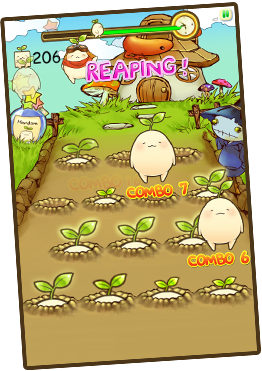
If at daytime:
At evening also you can see the sky start turn to orange color. No picture of this but you can go ahead try it out.
p/s: I am competing with my wife of the ranking of this game, hehehe.
Like this if you are FB user and you think this post is useful. The button is at top right of content of this post.
+1 this post if you are Google+ users and you think this post is useful.
Hope you will enjoy this post, subscribe to my RSS or mailing list or follow me on blogger or twitter. :)
pic source: http://www.rayark.com/g/mandora
There is a problem with native Android interface (anything older than ICS), you have to click and click and click and click to enable or disable data connection (GPRS/EDGE/3G). I always like my interface on my Windows Mobile, where just 2 clicks and I am on/off the data. I found this widget recently.
For free version, you get to enable/disable data and WIFI respectively.
For Advanced PRO version, which include these features, that going to cost you US$1.26.
- how many minutes in between to turn on data
- how many seconds to allow data turn on before shut it off
- etc.
Anyway, I am only interested for the on/off feature as the widget, that is good enough for me.
Like this if you are FB user and you think this post is useful. The button is at top right of content of this post.
+1 this post if you are Google+ users and you think this post is useful.
Hope you will enjoy this post, subscribe to my RSS or mailing list or follow me on blogger or twitter. :)
pix source: google play
Problem with smartphone is there is no way to upgrade the hardware. Okay, the only way is to buy a new smartphone. Or get a bigger microSD card, but only if it support it. Therefore I would never buy iPhone, except you give me a free one, hahah.
The best thing about Android (and Windows Mobile, yes, the dinosaur mobile OS) is customization. All you need to do is search in Android forum such as XDA and you will find something very useful to make your Android has a good feel.
So if your phone is confirmed not getting Jelly Bean (Android 4.1), but you would like to have a good stuffs of Jelly Bean, this app might be one of them you can add to your Android.
Control panel for Android: Quick access the ringtone, volume and bright adjustments selector.
Quick access the personalization options using the quick settings that works like to the new Android 4.2 feature.
You can launch the quick setting with some launchers gesture:
Like this if you are FB user and you think this post is useful. The button is at top right of content of this post.
+1 this post if you are Google+ users and you think this post is useful.
Hope you will enjoy this post, subscribe to my RSS or mailing list or follow me on blogger or twitter. :)
pix source: XDA
If you are stuck with stock ROM and does not wish to root it. Or if your Android will not get Jelly Bean anytime soon. Or the manufacturer just keep on forgetting to update your Android OS for you. For any reason, here is a relief for you, you can enjoy Jelly Bean (Android 4.1) lock screen without need to root or install custom ROM. Any stock ROM would works.
Like this if you are FB user and you think this post is useful. The button is at top right of content of this post.
+1 this post if you are Google+ users and you think this post is useful.
Hope you will enjoy this post, subscribe to my RSS or mailing list or follow me on blogger or twitter. :)
source: http://forum.xda-developers.com/showthread.php?t=1771843
Everyone knows that apps are written by IT or programmer or engineers or someone that is good in computer programming language, but do you know what you can build apps without knowing all the knowledge? All you need is know what you want the apps does. The website will handle everything else.
TheAppBuilder is a company that provide this service. They will not charge anything until you decided to publish the apps to Google Market (Google Play), App Store, and WP MarketPlace. So you can play with the apps with your friends and family.
TheAppBuilder is now support iPhone, iPad, Android & Windows Phone.
The basic operation of TheAppBuilder is something like this:
1. Start building apps on TheAppBuilder.
2. Download the apps into your smartphone
3. The apps is actually the skeleton of the apps, which contains the special code and ID, which will be talking with cloud server.
4. The actual work is being done at cloud server, but you will see it in action on your smartphone.
The apps build with TheAppBuilder is therefore need internet connection all the time to work properly. Please note that internet connection is not always cheap in many countries and 99% of telco.
You can see the how-to guide here (very long video):
Like this if you are FB user and you think this post is useful. The button is at top right of content of this post.
+1 this post if you are Google+ users and you think this post is useful.
Hope you will enjoy this post, subscribe to my RSS or mailing list or follow me on blogger or twitter. :)
video source: TheAppBuilder
Nowadays everything must be fast and quick. Anything that slow is a big NO NO. That's why we have google, smartphones, GPS, and tablet, everything has to be done within a blink of eyes. That's why Quixey come to the picture. It helps us to find apps for everything. Yes, everything meaning Android, iOS, Mac, Windows, Chrome, Firefox, Facebook, and so on.
I did a search for WhatsApp, the very hot apps on Android, iOS and Blackberry. The result is WhatsApp for Android, Blackberry, iOS and Nokia. Beside the price, it also include some introduction and version number. If there is picture or tweets or video about the apps, you can also take a look of the apps before go to download/buy it.
The search result also shows some other similar apps.
Next search for Angry Birds Rio. 12 editions of Angry Birds Rio show up, including free version, paid version and HD version.
So if you saw your friends using a cool apps on his/her smartphone, don't worry that you will left out if you using different OS/platform. Go to Quixey to find the apps.
Note this: jailbreak require to enable this apps or feature. If you don't want to do jailbreak, go buy another iPad. :P
Okay, back to this iUser.
Apple created iPad for individual only and not for family, so what if you want to share the iPad but don't want to have each user interfere others user setting such as safari bookmark, twitter account, facebook login, etc? The quick way is to buy another iPad, but this could break the bank account for some of the family. 90/10 rules says that 90% of the wealth in this world control/own by 10% of people in this world. You see what I mean? :)
With this iUser, you can have multi users login, just like Windows! Who said Windows sucks? :P
This apps is now available at Cydia [jailbreak source! :) ]
Hope you will enjoy this post, subscribe to my RSS or mailing list or follow me on blogger or twitter. :)
source: i wrote this after reading it at engadget :P
What is Swype? It is a on screen keyboard for smartphones and now they are going into tablets. You can type just like normal on screen keyboard or sweep your finger across the key that you supposedly typing. See the video to find out more after the jump......