Showing posts with label free app. Show all posts

Sunday, February 3, 2013

[free apps] Floating Stickies

I always like stickies since high school time, it helps to remind me of project due dates, what should I focus on, what are the homework. of course that time that stickies is the real papers. It save money, I recycled papers that I collected from PC fair, at that time you can get whole stack of papers just take around at the PC fair, most of them just being print on one side, so I get to use the other side.

When I start working, stickies still a great tool for me. There are a few stickies program for Windows XP. First version of Windows 7 come with a gadget that is exactly a stickies, however Microsoft removed it on sub-sequence version of Windows 7. Now with almost everyone on smartphone, there should be stickies for smartphone right?

Wrong, of all the stickies (Android, iOS, and others), stickies has to works within that apps itself, there is not way to take a note on stickies while looking at other apps (browsers, emails, sms, etc). Unless you have Galaxy S 3 or Note 2 that have multiple windows function, you have to do these:
1. You remember the numbers or words, then close the apps, open stickies and write it on stickies. Oh-no, what was the last digit? Okay, you have to open the apps just now and repeat the steps.
2. Write it on a piece of papers and then write it back to the stickies apps. Sigh.
3. Print screen.

Now I found the real stickies on XDA forum. It works just like the one on Windows. It is called Floating Stickies.
You can dock it to side of the screen, as well as resize it. I like it!

Watch the demo video, I am installing this apps now!


Since it supports Android 2.1 and above, majority of Android users can install and use it!


I have a quick check on iTunes, no iOS apps works like this one. Take that Apple fan boys, muahahahaha.

Get it from Google Play:
https://play.google.com/store/apps/details?id=genius.mohammad.floating.stickies


Like this if you are FB user and you think this post is useful. The button is at top right of content of this post.
+1 this post if you are Google+ users and you think this post is useful.
Hope you will enjoy this post, subscribe to my RSS or mailing list or follow me on blogger or twitter. :)
source: XDA

Wednesday, January 30, 2013

[Free Game] Sheep Jump 8-bit

If you are too young, you might don't know what is 8-bit. 8-bit was once rules the gaming world, where all the game are just 256-colors. No 3D, but we did enjoyed Wolfenstein 3D.

Sheep Jump is purposely made 8-bit. Have that kind of retro feel.
What Sheep Jump have to offer:
1. infinite amount playtime -> can't stop playing if you are addicted
2. endless level -> can't finish the game??????
3. unpredictable jumps -> the sheep or the player?
4. controlled physics -> who? God?
5. Global leaderboard -> I just want to enjoy this game, don't care the score at all
6. support multiple players -> you can compete with family/friends on same phone

Problems that I found on Sheep Jump:
1. you need to connect to internet to create player
2. must register in order to play
3. ads when you are connected to internet -> hate it, should ban apps with ads with any "free" name or keyword.
4. some users claimed that ads interfered with the game play.

Anyway, if you still interested, download it from Google Play:
https://play.google.com/store/apps/details?id=air.co.za.rainisfalling.SheepJump


Like this if you are FB user and you think this post is useful. The button is at top right of content of this post.
+1 this post if you are Google+ users and you think this post is useful.
Hope you will enjoy this post, subscribe to my RSS or mailing list or follow me on blogger or twitter. :)
pix source: XDA

Monday, January 28, 2013

[Free apps] Spy Camera OS

Okay, OS is not Operating System, it is Open Source in this case.

Ever since smartphone come with decent camera, everyone keep on snapping photos with their smartphone, either Android, iPhone, WP, BB, etc. While stock camera apps and free and paid camera apps try to make you know that you are snapping a photos by creating a camera sound. However at some cases you just want to take the photo without anyone noticing it. Okay, you can change to mute to avoid people noticing it, but the preview on the screen already tell others that you are taking a photos. So how now?

Senior member of XDA created this camera apps, called Spy Camera OS.

As you can see from the picture below, the preview is very small.
Here is what Spy Camera OS will does:
1. Automatically mute the phone when apps start -> no camera sound, it will switch back to your existing setting after you exit the apps.
2. Take video -> even though author claimed that it is still experimental, I have tried it out, and it works!
3. Take photo with black screen -> now no one will knows you are taking photos, but problem is you don't know are you aiming correctly, this should work together with auto mode. Also take photo when touch the screen during black screen.
4. Auto mode -> take photo at the period that you set (1 photo every 1 to 10 seconds).
5. Hide the photo folder -> in case you still get caught, they can't find the photo.
6. Configure photo/video size upfront -> so that you don't run out of memory or taking a photo that is too blur.
7. Configure volume buttons to take photo/video/etc -> nice!
8. Face detection auto shot -> I tried, but it didn't works on me, can't recognize my face??????
9. Save to internal or external storage -> every apps should have this setting!


What are the things Spy Camera OS that missed out:
1. burst mode
2. make the preview transparent

XDA even make a review video of this apps:


To get it, go to Google Play:
https://play.google.com/store/apps/details?id=com.jwork.spycamera


To feedback on this apps, go to this XDA forum thread:
http://forum.xda-developers.com/showthread.php?t=1934513

If you are a developer and wanted to look at the code, here is the code (that's why it is Open Source):
https://bitbucket.org/jimmod/spycamera

Like this if you are FB user and you think this post is useful. The button is at top right of content of this post.
+1 this post if you are Google+ users and you think this post is useful.
Hope you will enjoy this post, subscribe to my RSS or mailing list or follow me on blogger or twitter. :)
pix source: Spy Camera author

Sunday, January 20, 2013

List of Mobile Apps of Banks in Singapore

Since I wrote about list of Mobile Apps of Banks in Malaysia, I wonder if I should write a list of Mobile Apps of Bank in Singapore.

Hence this list of Mobile Apps of Banks in Singapore, in no particular order (and features and other stuff are as of Jan 2013, iPad apps not included).

Banks Android Apps iOS Apps Type of Transactions Branches/ATM Locator Others (+=pros; -=cons)
DBS link link Funds transfer
Pay bills
Balance inquiry
Bank Contacts
Yes+IPO application
POSB link link Funds transfer
Pay bills
Balance inquiry
Bank Contacts
Yes+IPO application
OCBC link link Funds transfer
Pay bills
Balance inquiry
Bank Contacts
Yes+Scan bar code to pay bills (this is the best feature I have seen)
Citibank link link Balance inquiry
Share trading (US, SG, HK)
Yes (worldwide) +Latest Citibank Singapore promotions
+Share trading
-Does not pay bills
UOB link link Funds transfer
Balance inquiry
Bank Contacts
Yes
+Send money to anyone, even without UOB account, that can be withdraw from UOB ATM machines
+
Load calculator
+Latest bank promotions
-Does not pay bills
Maybank link link Funds transfer
Pay bills
Balance inquiry
Bank Contacts
Yes+Fixed Deposit placement
+Pay bills in Malaysia and Singapore
+Latest Maybank Singapore promotions
CIMB link link Funds transfer
Pay bills
Balance inquiry
Bank Contacts
Yes+Fixed Deposit placement
+Load calculator
-No Android apps
Standard Charted link link Funds transfer
Pay bills
Balance inquiry
Bank Contacts
Yes
+Latest bank promotions (on iOS only!)
-
Need Adobe Air installed
-worst rating on Google Play (2.7 only! Any crappy games will get at least 3.0)
HSBC link link n/a n/aNo mobile apps for HSBC Singapore (and Malaysia), shame on you HSBC, because your slogan is World's Local Bank, oh wait, that explained? :P

I have created Playboard widget, if you want to save time, install Playboard (from Google Play) and go to this channel:
List of Mobile Apps of Banks in Singapore


The list is correct at the time I writing this (Jan 2013). Please leave a comment here or on PenangUncle FaceBook page:
1. if you found those that listed here that don't have mobile apps start to have mobile apps
2. other banks that I left out
3. Features that added/removed


Like this if you are FB user and you think this post is useful. The button is at top right of content of this post.
+1 this post if you are Google+ users and you think this post is useful.
Hope you will enjoy this post, subscribe to my RSS or mailing list or follow me on blogger or twitter. :)
source: google google and google

Monday, January 14, 2013

List of Mobile Apps of Banks in Malaysia

As I moved into Android world (since I got my SGS2, well, I have been playing with Android apps with Android emulators, Jar of Beans, pokki, and bluestacks), I found there are endless of Android apps. Number of free apps on iOS was king, but then was taken over by Android since 2011 or 2012, does not matter now.

Android apps (apk) was not being regulated like iOS, therefore we should always only install apps from Google Play and apps developer only. I was thinking to start using mobile banking apps on my SGS2, therefore doing some research. Hence this list of Mobile Apps of Banks in Malaysia, in no particular order (and features and other stuff are as of Jan 2013, iPad apps not included).

Banks Android Apps iOS Apps Type of Transactions Branches/ATM Locator Others (+=pros; -=cons)
Citibank link link Funds transfer
Pay bills
Balance inquiry
Yes (across Asia)+Latest Citibank Malaysia promotions
Maybank link link Funds transfer
Pay bills
Balance inquiry
Prepaid reloads
Bank Contacts
No+Loan calculator
-Android user complained the apps logout when apps goes to background
CIMB link link Funds transfer
Pay bills
Balance inquiry
Prepaid reloads
Bank Contacts
Yes+Fixed Deposit placement
+Gold Investment
+Load calculator
-Transactions allowed on one account only, does not works for other accounts that you have with CIMB
Standard Charted link link Funds transfer
Pay bills
Balance inquiry
Bank Contacts
Yes-Android users complained long loading time
-Need Adobe Air installed
-confusion on the apps name (it is called Breeze - a known detergent brand in Malaysia :P)
Hong Leong link link Funds transfer
Pay bills
Balance inquiry
Bank Contacts
Yes+Bank promotions
+PEx (send money to others via their mobile numbers)
-rated 2.8 on Google Play
-can't pay bills
OCBC link link n/a n/aNo mobile apps for OCBC Malaysia! (They do have for Singapore)
Public Bank link link n/a n/aNo mobile apps for Public Bank! (Only Share Investment apps, search for "PB Sharelink" in Google Play/iTunes)
RHB link link Funds transfer
Pay bills
Balance inquiry
Bank Contacts
Yes+Bank promotions
Affin Bank link link n/a n/aNo mobile apps for Affin Bank
Alliance Bank link link n/a n/aNo mobile apps for Alliance Bank (there is a share investment apps on iTunes, no Android - shame on you!)
Ambank link link n/a n/aNo mobile apps for AmBank
HSBC link link n/a n/aNo mobile apps for HSBC Malaysia
UOB link link n/a n/aNo mobile apps for UOB Malaysia
Bank Islam link link Bank Contacts Yes+Bank promotions 
+Prayer times (for Muslim)
-can't check balance
-can't do funds transfer
-can't pay bills
Bank Rakyat
BSN
Agro Bank
Bank Muamalat
link link n/a n/aNo mobile apps for these banks

I have created Playboard widget, if you want to save time, install Playboard (from Google Play) and go to this channel:

List of Mobile Apps of Banks in Malaysia

The list is correct at the time I writing this (Jan 2013). Please leave a comment here or on PenangUncle FaceBook page:
1. if you found those that listed here that don't have mobile apps start to have mobile apps
2. other banks that I left out
3. Features that added/removed


Like this if you are FB user and you think this post is useful. The button is at top right of content of this post.
+1 this post if you are Google+ users and you think this post is useful.
Hope you will enjoy this post, subscribe to my RSS or mailing list or follow me on blogger or twitter. :)
source: google google and google

Thursday, January 10, 2013

[Free Apps] Pleco - The Best Chinese Dictionary

Pleco has been in business for very long time. I know about Pleco when I was using my HTC Touch Elfin, that is Windows Mobile OS. Pleco has been on WinMo, Palm OS, iOS and now Android.


It is very good tool for students, as well as people that just started to learn Chinese. The reason is Pleco support pinyin input. So for those that lazy to write, as long as you know the pronunciation of the Chinese character or words, just type the pinyin. Example:

You should install Pleco now, it is because handwriting input module is free for now (Android only!), until Jun 30th this year. This module usually cost USD $14.95. I have checked, this module is not free on iOS. So iPhone/iPad/iPod Touch only can key-in pinyin or Zhuyin (for traditional Chinese - HK, Taiwan). Muahahaha. The handwriting module is for you to keep after the offer ended, Pleco will issue you a code that you can download it again for free if you move other a newer Android phone in future (example: Samsung Galaxy S4?)

More muahahaha after checking on pleco.com:
Audio Pronunciation (male) module - free on Android; $9.95 on iOS -> muahahahaha
Flashcard system - free on Android, $14.95 on iOS -> muahahahaha

Unlike other dictionary apps which one dictionary per apps, Pleco support multiple dictionaries. CC-CEDICT Chinese-English Dictionary is the default dictionary. The list of free dictionary that you can download and add to Pleco:
Unihan Database (extended)
Adsotrans Chinese-English Dictionary
LDC English-Chinese Wordlist
HanDeDict Chinese-German Dictionary
DeHanDict German-Chinese Dictionary
CFDICT Chinese-French Dictionary

Pleco also offer license transfer from one OS to another within 1 year of license purchased. So if you regret that you bought the lousy iPhone, don't worry about Pleco dictionary, you can email Pleco so that you can have the same dictionary on Android, without any extra changes (if not mistaken).


Caution: Pleco need to download additional files (most probably the default dictionary) during first run, make sure you are on WiFi or unlimited data plan.

Right now Pleco has 2 version on Google Play, the one with "CN" in front is for China that cannot download paid apps. I installed the normal version on my SGS2, works perfectly.
https://play.google.com/store/apps/details?id=com.pleco.chinesesystem
https://play.google.com/store/apps/details?id=com.pleco.chinesesystem.cn

It also reported works on CyanogenMod and other popular ROMs.You can download it from Pleco website:
http://www.pleco.com/getandroid


Like this if you are FB user and you think this post is useful. The button is at top right of content of this post.
+1 this post if you are Google+ users and you think this post is useful.
Hope you will enjoy this post, subscribe to my RSS or mailing list or follow me on blogger or twitter. :)
pix source: Pleco.com and Google Play

Tuesday, January 8, 2013

[Free Game] SiliBili

Your Apple fanboy friends always show off 3D games on their iPhone/iPod/iPad and you still wonder why you choose Android at first place? Don't doubt it anymore, you made the right choice. SGS2 is almost 2 years old device, but Samsung going to release Jelly Bean for it. For those that already flash with alternative ROMs, you know that SGS2 is capable of running Jelly Beans without any hiccup. Therefore, time to laugh at your friends who has to queue up at Apple store every year to buy a new device.

Here is a 3D game that you can impress the Apple fanboy:


I am too lazy to explain the game, you can read it at Google Play. Watch the featured video.


This link is to the Google Play (Lite version):
SiliBili Lite

If you are really hooked with the game, consider buying full version to support the developer.
SiliBili (Full version)


Like this if you are FB user and you think this post is useful. The button is at top right of content of this post.
+1 this post if you are Google+ users and you think this post is useful.
Hope you will enjoy this post, subscribe to my RSS or mailing list or follow me on blogger or twitter. :)
pix source: Google Play

Sunday, January 6, 2013

[free] BluMind - Mind Mapping Software

Tony Buzan invented Mind Mapping. I had the opportunity to attend one of his talk while he was in Penang few years ago. I also attended mind mapping course which trained by the trainer trained by Tony Buzan. Anyway, using papers and pens seems like not too environment friendly. Therefore using software on PC would be the better choice. Tony Buzan's company does offers mind mapping software, but is very costly.

Even though there is free version, but with limited function. If you want more functions, then you have to buy home/student version which cost 49 pound.

Luckily (as always :) ), there is a few mind mapping software that is totally free that we can use.

I am using BluMind these few days for my work. BluMind has installer or portable version. I always like portable version of any software.


Thanks to many the contributed, BluMind has many translated language, including Hindi, Japanese, Chinese (both type), Korean, and many Europe language. It can export to pictures (PNG, JPEG, BMP, etc) and CSV. Also can add icons, add remarks, progress mark. There is a timer, which I think is very good for time keeping, because with limited time, human brain usually will works faster.

Get your BluMind today:
http://blumind.org/


Like this if you are FB user and you think this post is useful. The button is at top right of content of this post.
+1 this post if you are Google+ users and you think this post is useful.
Hope you will enjoy this post, subscribe to my RSS or mailing list or follow me on blogger or twitter. :)
pix source: blumind.org

Friday, December 28, 2012

WPS Office - Another MS Office Alternative

MS Office is always the main office software being use by main stream business and most of the industry. However if you are just starting a new business or a SOHO or a freelancer, buying a MS Office software can be very costly. Nowadays PC maker tried very hard to save cost, therefore some of the time the PC/laptop you bought is installed with evaluation version of MS Office or some just don't have MS Office at all.

MS Office Home and Student edition cost USD $150. MS Office Home and Business edition cost USD $280. Plus you need to pay additional USD $25 per language pack that you want to include. That's is very expensive.

Luckily there is always a lot of nice people on the world wild web (world wide web) to write free software. There are a lot of alternative to MS Office, among the famous one such as OpenOffice and LibreOffice. WPS Office is a made in China (what is not made in China nowadays? ;) ) alternative to MS Office.


Recently WPS Office has been upgraded to SP2. What so special of WPS Office?
  1. It is very small, setup file 41.6MB only.
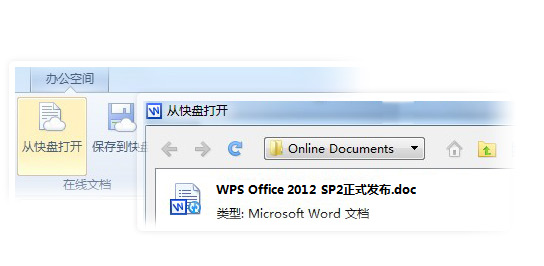
  2. It opens documents on cloud storage.
  3. Auto recovery.
  4. WPS Excel supports long numbers (Unlike MS Excel changed everything to xx.xxE+xx).
  5. Free template from WPS forum.
  6. Directly post to WeiBo (China's twitter).
The only drawback is WPS website is completely written in Chinese. No problem for people that is Chinese educated, but what about other people? I am downloading it right now to see if WPS Office can support English or other language only Windows.

If you are adventurous, go to this link to download it now:
http://www.wps.cn/product/wps2012/sp2/

Update: Confirmed that WPS Office is only in Chinese. Another thing is it will not ask your permission before it take over all the office files to be open by WPS. What a shame, sounds like another non-sense software (Remember Real Player?). I am uninstall it now.


Like this if you are FB user and you think this post is useful. The button is at top right of content of this post.
+1 this post if you are Google+ users and you think this post is useful.
Hope you will enjoy this post, subscribe to my RSS or mailing list or follow me on blogger or twitter. :)
source: wild wild web

Thursday, December 6, 2012

[Free Game] ZooKeeper Battle

ZooKeeper was once a very popular game based on flash being played by a lot people on WIndows and online as well. Too bad it is not free on Google Play. However now there a free new game from same developer.

Similar to the original ZooKeeper, the game play quite similar, line up 3 or more same animal. But getting combo is just how you going to beat the other players that you going to match with.


Here is the video of the game:


Download at Google Play:
https://play.google.com/store/apps/details?id=jp.kiteretsu.zookeeperbattle.google&feature=banner#?t=W251bGwsMSwyLDIwMSwianAua2l0ZXJldHN1Lnpvb2tlZXBlcmJhdHRsZS5nb29nbGUiXQ..


Like this if you are FB user and you think this post is useful. The button is at top right of content of this post.
+1 this post if you are Google+ users and you think this post is useful.
Hope you will enjoy this post, subscribe to my RSS or mailing list or follow me on blogger or twitter. :)
pix source: google play

Sunday, December 2, 2012

[Free Game] Mandora

We don't need to worry about free apps or games on Android, there are plenty of them. In fact there are too many that you will never ever install all of them because memory and microSD card will be full way before you can install half of them! :P

I found this game Mandora recently from some free stuffs website from Taiwan. Mandora is made in Taiwan. But don't worry, the interface is in English.


What you need to do is pluck the mandora seed when they are ripe. The question mark in above picture will show you how.


I was skeptical about this game right after I installed it on my wife's Samsung Galaxy W because there is no button to choose level or difficultly. However when I check back it's website, then only noticed that the game play will depend on the time you play. If you play at night time, you will see this:

If at daytime:

At evening also you can see the sky start turn to orange color. No picture of this but you can go ahead try it out.

Mandora is available at Google Play:
https://play.google.com/store/apps/details?id=com.rayark.uproot

Mandora also available for iOS:
https://itunes.apple.com/app/mandora/id541790591

Okay, there is the trailer:


p/s: I am competing with my wife of the ranking of this game, hehehe.


Like this if you are FB user and you think this post is useful. The button is at top right of content of this post.
+1 this post if you are Google+ users and you think this post is useful.
Hope you will enjoy this post, subscribe to my RSS or mailing list or follow me on blogger or twitter. :)
pic source: http://www.rayark.com/g/mandora

Sunday, November 18, 2012

[Free] Data Switch Widget for Android

There is a problem with native Android interface (anything older than ICS), you have to click and click and click and click to enable or disable data connection (GPRS/EDGE/3G). I always like my interface on my Windows Mobile, where just 2 clicks and I am on/off the data. I found this widget recently.

For free version, you get to enable/disable data and WIFI respectively.

For Advanced PRO version, which include these features, that going to cost you US$1.26.
- how many minutes in between to turn on data
- how many seconds to allow data turn on before shut it off
- etc.

Anyway, I am only interested for the on/off feature as the widget, that is good enough for me.

The widget that turn on/off data easily:

Okay, only PRO version can set the time:

To install, go to google play:https://play.google.com/store/apps/details?id=cb56.dataeasy&feature=search_result#?t=W251bGwsMSwxLDEsImNiNTYuZGF0YWVhc3kiXQ..

Detail of each version at XDA forum:
http://forum.xda-developers.com/showthread.php?t=1960429


Like this if you are FB user and you think this post is useful. The button is at top right of content of this post.
+1 this post if you are Google+ users and you think this post is useful.
Hope you will enjoy this post, subscribe to my RSS or mailing list or follow me on blogger or twitter. :)
pix source: google play

Wednesday, November 14, 2012

Quick Settings like the Android 4.2 feature

Problem with smartphone is there is no way to upgrade the hardware. Okay, the only way is to buy a new smartphone. Or get a bigger microSD card, but only if it support it. Therefore I would never buy iPhone, except you give me a free one, hahah.

The best thing about Android (and Windows Mobile, yes, the dinosaur mobile OS) is customization. All you need to do is search in Android forum such as XDA and you will find something very useful to make your Android has a good feel.

So if your phone is confirmed not getting Jelly Bean (Android 4.1), but you would like to have a good stuffs of Jelly Bean, this app might be one of them you can add to your Android.

Control panel for Android: Quick access the ringtone, volume and bright adjustments selector.

Quick access the personalization options using the quick settings that works like to the new Android 4.2 feature.

You can launch the quick setting with some launchers gesture:

Head to this XDA thread for download and details:
http://forum.xda-developers.com/showthread.php?t=1982030


Like this if you are FB user and you think this post is useful. The button is at top right of content of this post.
+1 this post if you are Google+ users and you think this post is useful.
Hope you will enjoy this post, subscribe to my RSS or mailing list or follow me on blogger or twitter. :)
pix source: XDA

Tuesday, August 28, 2012

(Give Away) 1AVCenter: complete audio video center

This blog has been running for 3 years and 1 months but I haven't really do any give away. In fact, none. Why? Because I am a stingy Outdated Penang Uncle. Haha.

I have been scouting for my next smartphone for months but I haven't found the right one, or because I still feel like those smartphone that I like is costing too much. So I will continue using my very very outdated HTC Touch Elfin.

Anyway, it is like someone can hear me, because I was planning to run a give away on Facebook page. But the gift would be limited to Malaysian only because the gift card is for using in Malaysia only. But luck strike, Alex from pcwinsoft.com contacted me though twitter if I want to run a give away on this blog. And this is also a good luck for everyone (not limited to Malaysian) because this give away is for everyone in this planet earth, and maybe Martian that already start contacting Curiosity.

So what is 1AVCenter?

Okay, it is not the AV that Japanese used to. AV stands for Audio Video in this case.

In short:
1AVCenter is for record, broadcast and remote surveillance of any audio and/or video source on your PC. You can also share files via secure web server that come with 1AVCenter.

Lengthy version:
Here is what 1AVCenter does:

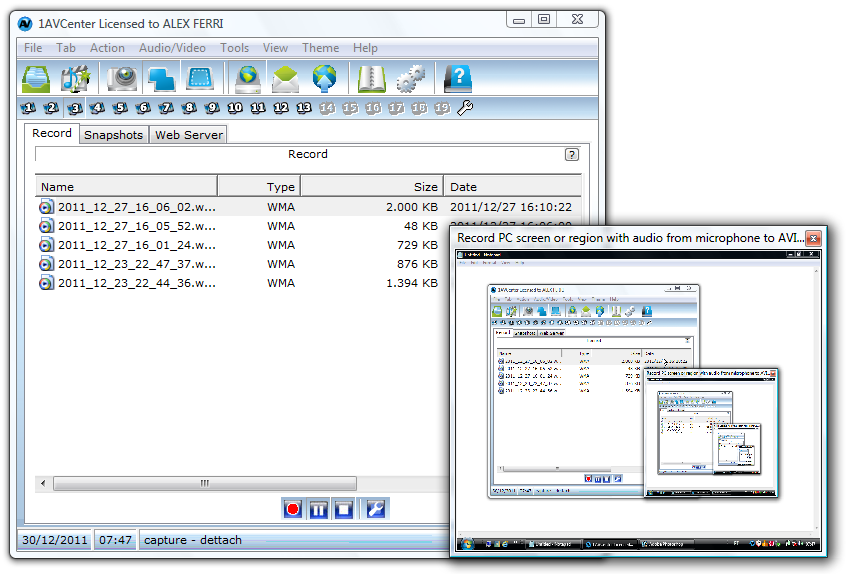
Here is 1AVCenter in action (recording screen):

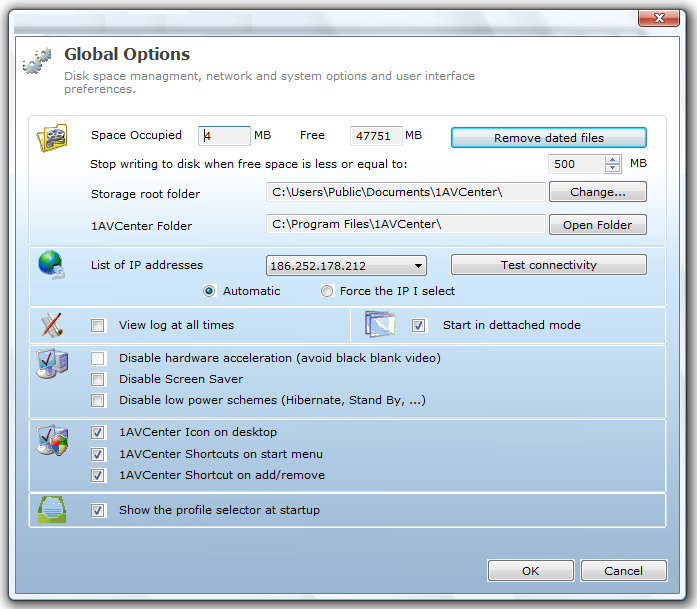
Here is 1AVCenter options:

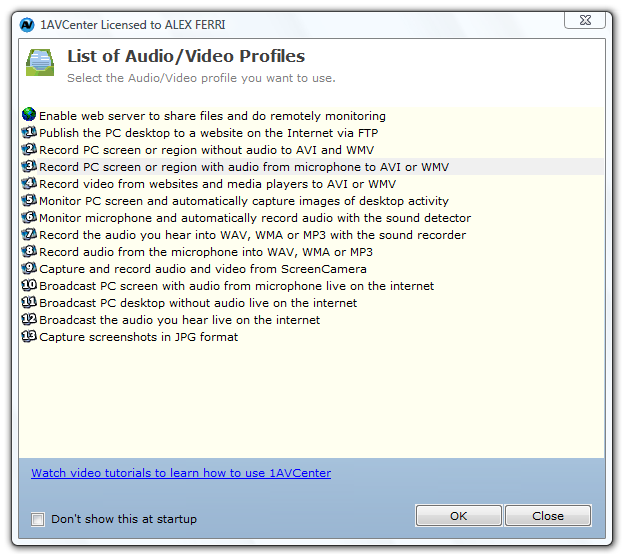
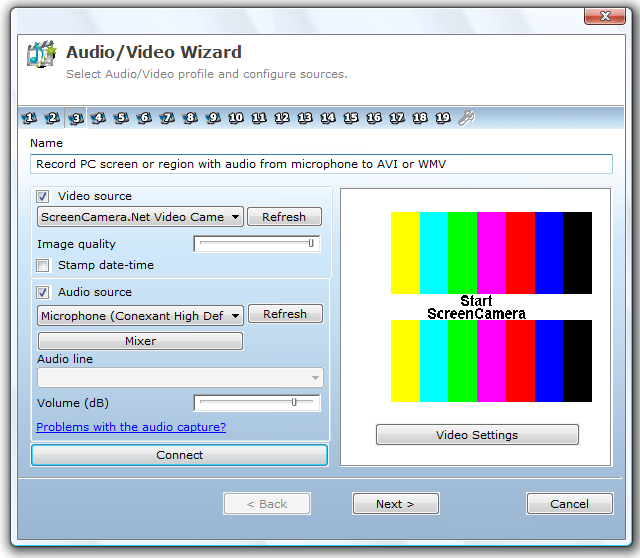
Here is how you can choose audio/video source for recording on 1AVCenter:

The screen capture is just normal, just like any other screen capture program.

So I try out the screen recording feature of 1AVCenter:


It gets 5 cows on Tucows and cost $99.95 (US dollar!) if you buy from pcwinsoft.com website. Now it is absolutely free. How?

1. Download the setup file and install it on your PC/laptop.
http://www.pcwinsoft.com/download/1AVShrInstAG.exe

2. During installation it will ask for "Buy", "Register" and "Try", leave it now without any button on the windows.

3. Go to this link to register with your info and email and wait for the registration key to arrive at your inbox.
http://www.pcwinsoft.com/promotion/OutdatedPenangUncle/registration.asp

4. After you get the registration key, copy the code and go back to the installation windows, click "Register" and enter the code there.

5. Now you just register a $99.95 worth of software for free!

Enjoy your screen capture and recording. :)

Before I forget, this is basic requirement:
  • Intel 1.3GHz
  • 120MB HD
  • 256MB RAM
  • Windows 2000/XP/2003/Media Center/Vista/Windows 7/Windows 8
  • Minimum screen resolution of 800x600

Note: I am too lazy to add audio in the above youtube video, you can screen capture video and audio at same time with 1AVCenter.

Note2: I am not sure how long the give away will be, most probably until pcwinsoft.com says stop. Why not just give it a try now. :)

Note3: I am not responsible if you break your Windows/PC/laptop/car/arms and legs/wallet because of this give away. :P


Like this if you are FB user and you think this post is useful. The button is at top right of content of this post.
+1 this post if you are Google+ users and you think this post is useful.
Hope you will enjoy this post, subscribe to my RSS or mailing list or follow me on blogger or twitter. :)
pix source: pcwinsoft.com

Sunday, August 12, 2012

Find Windows CD Key and others

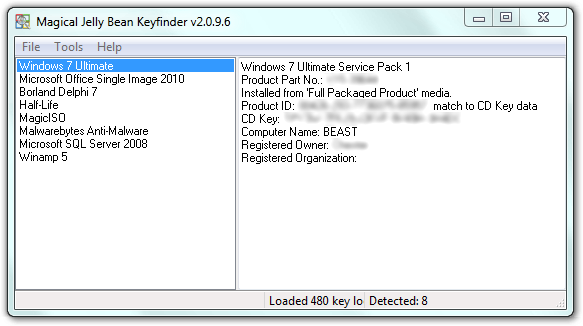
Saw this software / apps at a website. Magical Jelly Bean Keyfinder (no, not Android 4.1) is a free apps that helps to retrieve your Windows, MS Office, Winzip and many more CD Key. Sometime we might misplace the original DVD of the Windows, MS Office or other apps after we copy all the installers into another HD or partitions. So when we want to format and reinstall the Windows and etc, we can't find the CD key. Some might have to spend times and money to get it from Microsoft or other software company, or buy another one?

pix credit: http://www.magicaljellybean.com/keyfinder/


Anyway, with Keyfinder (I don't want to say the full name again), you can retrieve the CD key and save it down on a USB drive or papers.

Where is the catch you might ask. Yes, this apps only support 300+ software (as it claimed), if you want more coverage like 3600+ programs, then you have to buy the full version, which is called Recover Keys, which cost US$24.95 for single license.

Okay to the apps/software:
http://www.magicaljellybean.com/keyfinder/
Official portable version available, woohoo!


Like this if you are FB user and you think this post is useful. The button is at top right of content of this post.
+1 this post if you are Google+ users and you think this post is useful.
Hope you will enjoy this post, subscribe to my RSS or mailing list or follow me on blogger or twitter. :)
source: internet!

Sunday, July 29, 2012

Caffeine: coffee for PC?

This Caffeine is not Starbucks or instant coffee. This Caffeine is a simple program to keep your PC or laptop awake.
Here are the situations I can think of that this Caffeine could useful:
1. you are using someone else laptop/PC, the sleep time on this laptop/PC could just a few minutes and if you are doing a presentation on it, it will be very annoying if every few minutes you need to shake the mouse to get it up from screen off or sleep mode.
2. you are day-dreaming in office, but you don't want the boss to notice it because the screen will be turn-off.
3. some websites will expire if your screen is off and locked, you want the website thinks you are still on it, even though you are not there.

Caffeine might be useful in these situation.
pic credit: http://www.zhornsoftware.co.uk/caffeine/


How it works? Simple, by emulating pressing of F15 key. F15 does not exist on most of the keyboard, therefore it will not change your program or anything, but keep the computer/laptop/PC awake. You can also change the default setting to something else, but you have to do it using switches and launch it via command prompt. You can also make a .bat file with the switches that you want and double click on the .bat file every time you want to keep your PC/laptop awake.

Get your Starbucks for your PC/laptop here:
http://www.zhornsoftware.co.uk/caffeine/


Like this if you are FB user and you think this post is useful. The button is at top right of content of this post.
+1 this post if you are Google+ users and you think this post is useful.
Hope you will enjoy this post, subscribe to my RSS or mailing list or follow me on blogger or twitter. :)
source: http://www.zhornsoftware.co.uk/caffeine/

Saturday, July 28, 2012

Stickies: replacement for Sticky Note

I believe a lot of Windows 7 (and Windows Vista) users have used Sticky Note gadget at least once. For those that like to use it or depend on it very often, the sad news is the later version of Windows 7 does not include Sticky Note. This happen to me as well. My first Win7 OS does has Sticky Note, and it did save some tree from some forest on this Earth. However when I got my new laptop, it is a more matured Win7, but Sticky Note disappear from the gadgets. Did Microsoft want to destroy more tree? I don't know.

Anyway, I found this freeware, or free apps which more people call it that way on every single software (except OS). This apps is Stickies.
pix credit:http://www.zhornsoftware.co.uk/stickies/

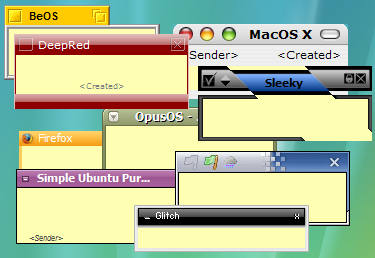
Not only this Stickies does the same thing that the Sticky Note does, but better [my comment in square bracket]:
1. Stickies appearance can be customized for fonts, colors. Buttons may be changed, and styles can be saved [reduce boredom]
 pix credit:http://www.zhornsoftware.co.uk/stickies/

2. Stickies can store text or images [yea, don't think original Sticky Note can store picture]

3. Stickies can snap to each other and to the sides of the screen to keep them neatly lined up [tidiness?]

4. Stickies can be attached to a web site, document or folder so they only show when it's on screen [I like this feature very much and it make sense!]


5. Stickies can be transferred from one machine to another either over a TCP/IP network connection, or by using an SMTP mail server or MAPI client. [okay, you have to do this for 1001 stick notes? otherwise who would need to do this]

6. Stickies can be hidden for a certain period, until a specified date and time, or to wake every day, week or month, to act as reminders [stick note the can remind me at the right time, nice!]

7. Stickies can have alarms set to ensure you notice them at a point you choose [nice!]

8. Free [yes!!!!!!]

To download Stickies:
http://www.zhornsoftware.co.uk/stickies/download.html

To download more skins for Stickies, go to:
http://www.zhornsoftware.co.uk/stickies/skins/search.pl

If you prefer portable version, here you go:
http://portableapps.com/apps/office/stickies_portable


Like this if you are FB user and you think this post is useful. The button is at top right of content of this post.
+1 this post if you are Google+ users and you think this post is useful.
Hope you will enjoy this post, subscribe to my RSS or mailing list or follow me on blogger or twitter. :)
source: Internet!

Monday, July 23, 2012

Install Jelly Bean Lock Screen without root

If you are stuck with stock ROM and does not wish to root it. Or if your Android will not get Jelly Bean anytime soon. Or the manufacturer just keep on forgetting to update your Android OS for you. For any reason, here is a relief for you, you can enjoy Jelly Bean (Android 4.1) lock screen without need to root or install custom ROM. Any stock ROM would works.


Get Holo Locker (Jelly Bean Lock Screen) from Play Store:
https://play.google.com/store/apps/details?id=com.mobint.locker
For any Android 2.2 and above.


Like this if you are FB user and you think this post is useful. The button is at top right of content of this post.
+1 this post if you are Google+ users and you think this post is useful.
Hope you will enjoy this post, subscribe to my RSS or mailing list or follow me on blogger or twitter. :)
source: http://forum.xda-developers.com/showthread.php?t=1771843

Thursday, July 19, 2012

Travel with Offline Map Apps

How many time you left your smartphone at home when go for travel? Never!

Only just a few years ago, when smartphone is not as good as computer replacement, some people would bring along their laptop when going for travel. But as you know "how light" is the weight of laptop at the time, even with the lightest one. Nowadays the smartphone as good as a computer, except the screen still smaller, but surfing internet, facebook, tweet, watch movie, everything that you need on a computer. In fact, iPhone and Android have more interesting apps than PC and Mac. Of course PC and Mac have more useful software, but for interesting apps, iPhone and Android still the best.

Stay.com is website the provide travel guide for free. Now they even offer their apps what works offline for free! When I went to Tokyo on April this year, I was using TripAdvisor which also offer tips and advise that works offline as well. We need to know that data roaming is very expensive for most of the country. The cheapest data roaming being offered in Malaysia is RM30++ (~US$10) per day!

Right now stay.com covered 117 cities, including cities in Asia such as Singapore, Kuala Lumpur, Hong Kong, Tokyo, and Istanbul. That is much better than TripAdvisor which offers not more than 20 cities if not mistaken. I wish stay.com will cover Osaka, and the cities at central to south of Japan, because that is my next destination. :)

See the video of what stay.com can help to plan your next trip.


Wish you have nice trip. :)

Stay.com link:
http://www.stay.com/

Direct link to stay.com apps on Google Play:
https://play.google.com/store/apps/details?id=com.stay

Direct link to stay.com apps on Apple Apps Store:
http://itunes.apple.com/us/app/stay.com/id438740289


Like this if you are FB user and you think this post is useful. The button is at top right of content of this post.
+1 this post if you are Google+ users and you think this post is useful.
Hope you will enjoy this post, subscribe to my RSS or mailing list or follow me on blogger or twitter. :)
source: internet!

Tuesday, July 17, 2012

Resize Windows with Sizer

GUI, ever since Steve Jobs invented Mac OS and Bill Gates make GUI to even greater height, all we know is Windows Windows Windows. Unless you are a full-screen guy (or girl), I am sure you will have various size of each windows. When I write blog, I need to refer to something, I will put them side by side. And after that, even un-snap from the edge of the screen, it don't really go back to original size. And I don't care, because I can resize it with a mouse.

However when I want to test my blog on a specific resolution, it because a headache. Luckily Sizer come to the picture.

credit: http://www.brianapps.net

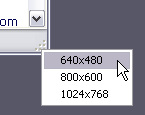
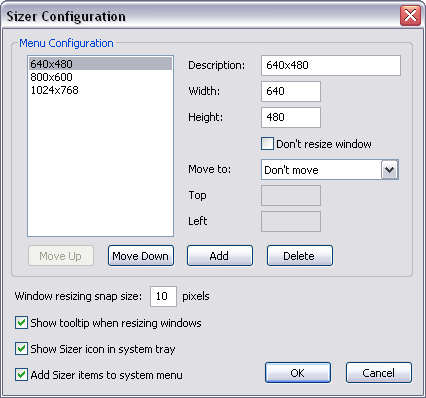
Sizer come with installation and portable version (Yeah!). The default setting are 640x480, 800x600, and 1024x768, these are the lower end of the screen resolution. But most of the time we need to make sure the website or blog we designing is fit into these resolution, so that even the people that using lowest spec can see read website or blog (netbook, ring a bell?).

credit: http://www.brianapps.net

You can also customized to any Windows size that you want in the setting.

To download, go to this link:
http://www.brianapps.net/sizer/


Like this if you are FB user and you think this post is useful. The button is at top right of content of this post.
+1 this post if you are Google+ users and you think this post is useful.
Hope you will enjoy this post, subscribe to my RSS or mailing list or follow me on blogger or twitter. :)
source: internet!
Related Posts Plugin for WordPress, Blogger...
 
Copyright © 2015 Outdated Penang Uncle
..........